1 / 1
Product Overview
Arcoro offers two integration paths to fit how your team works.
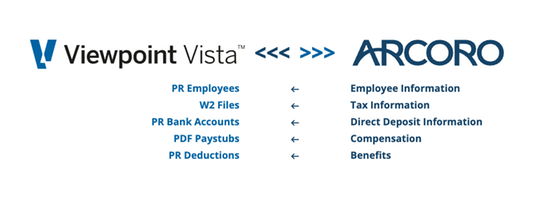
1. Automated Sync via Trimble AppXChange - Arcoro connects to Vista through the AppXChange platform. Employee data maintained in Core HR flows into Vista without manual exports, reformatting, or rekeying. Syncs run on your schedule or on demand, and AppXChange checks for new data from Arcoro approximately every 15 minutes — so once a sync is initiated, your payroll team is working with current records. Data flow: Arcoro Core HR → Trimble AppXChange → Viewpoint Vista Payroll
Option 2: File-Based Integration - For teams that prefer direct control over when data moves between systems, Arcoro’s file-based integration lets you manage the timing. Your team triggers exports from Core HR and imports them into Vista on a schedule that works for you. Data flow: Arcoro Core HR → Arcoro Integration Framework → Viewpoint Vista Payroll
Features
Sync HR, Benefits & Payroll Data with Ease
Keep your systems connected, reduce data entry mistakes and streamline your operations in the field and the office with Arcoro and Viewpoint Vista. Arcoro’s integration takes advantage of modern data-sharing technologies, making it easier to manage employee data.Reduce Data Entry and Increase Team Transparency
Streamline your construction HR operations by syncing employee data and payroll across Arcoro and Viewpoint Vista, eliminating manual data entry and providing transparency for every department from the field to the back office.Manage Data & Compliance Risk
Sync employee data across systems, reduce manual entry and manage compliance. Save time, minimize errors and keep your workforce connected from field to office.
Categories
HR Management
Workforce & Time Management
Support
View Full Support and ResourcesTerms & Conditions
Workforce & Time Management

Arcoro + Vista
Simplify Data. Strengthen Every Process.
Developer: Arcoro
- Works with Vista
- Certified by Trimble
Arcoro + Vista Resources

Arcoro + Vista integration via File Transfer
Arcoro + Vista integration via App Exchange
Attention
Please get in touch with your account owner for assistance. If you wish to make a purchase, we recommend signing out and creating a personal account.