1 / 4
Product Overview
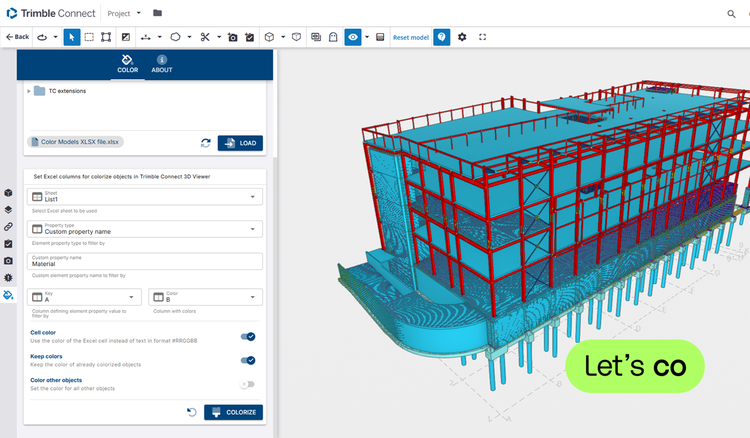
Take your BIM visualization to the next level with our powerful Color Models feature.
Designed for architects, engineers, and project stakeholders, this tool allows you to automatically or semi-automatically apply vibrant, data-driven color schemes to your 3D models—directly from an Excel file.
Effortlessly bridge data and design: by linking your .xlsx file to your IFC model, you can instantly visualize properties, classifications, or custom data points through color, helping you gain insights at a glance.
Features
Flexible colorizing
Apply colors to model elements based on IFC classification or any custom property.Simplify complex data
Whether you’re highlighting structural components, tracking construction phases, or visualizing asset metadata, Color Models simplifies complex data into instantly understandable visuals—making your 3D models not just informative, but impactful.Excel-based color input
Use Excel interface to assign colors or text codes (in the #RRGGBB format) to elements—simple, intuitive, and flexible.
Categories
BIM
BIM
Project Management
Drawings & Documents
Support
View Full Support and ResourcesTerms & Conditions
BIM
Color Models Extension for Trimble Connect
Color 3D models based on properties
Developer: Construsoft
- Works with Trimble Connect
Attention
Please get in touch with your account owner for assistance. If you wish to make a purchase, we recommend signing out and creating a personal account.