1 / 4
Product Overview
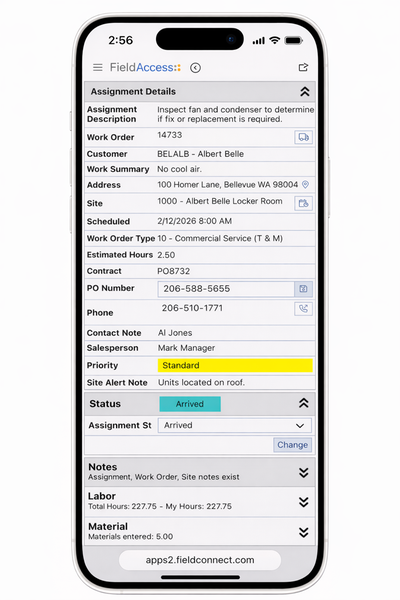
FieldConnect is a field service management platform that connects technicians, dispatchers, and the back office directly to Spectrum in real time, on any device. By eliminating manual entry and delayed data syncing, FieldConnect delivers faster billing cycles, fewer errors, and full visibility into labor and job costs. Built by field service experts with 20+ years of experience, FieldConnect helps contractors streamline operations, improve cash flow, and elevate the customer experience.
Features
Real-Time ERP Sync on Any Device
FieldConnect seamlessly syncs job details, labor time, materials, quotes, and updates directly to Spectrum the moment they’re entered. This eliminates double entry, reduces errors, and ensures your financial and operational data is always current. Real-time visibility and data-sync for accurate and up-to-date information empowers operations, accounting, and dispatch teams to work from a single source of truth, even out in the field on any device.Technician Efficiency Online and Offline
Technicians can access assignments, update work orders, capture photos, and complete all required documentation from any device, even without a network connection. With FieldConnect’s offline mode, all progress is saved locally and automatically synced once connectivity returns, ensuring work stays on track no matter the environment.Seamless Field-to-Customer Workflows
FieldConnect delivers a complete workflow from quote to job completion, ensuring every stage of the service process is connected and transparent. With an integrated customer and affiliate portal, you can accept service requests online, share real-time work order and equipment history, and enable customers to view and sign quotes, all in one streamlined platform. This end-to-end visibility enhances service delivery, strengthens customer relationships, and reduces administrative effort across the organization.
Categories
Service Management
Service Management
Support
View Full Support and ResourcesTerms & Conditions
Service Management

FieldConnect + Spectrum
ERP Connected Field Service Solution
Developer: FieldConnect
- Works with Spectrum
- Certified by Trimble
Attention
Please get in touch with your account owner for assistance. If you wish to make a purchase, we recommend signing out and creating a personal account.